
Intro
SEO can be hard. Getting people to click and notice your original content can feel brutal when you are just getting started.
That is part of what makes a platform like Dev.to so useful. It gives you access to a built-in developer audience that is already there to read, discuss, and share technical content. I started blogging on Dev.to while I was still in coding bootcamp, mostly to reinforce what I was learning. The response surprised me. People followed along, articles got traction, and for the first time it felt like publishing online might actually go somewhere.
Then I launched my own blog and started reposting the same content there too. That is when the SEO questions showed up.
If you publish the same article on your site and on Dev.to, you need to be deliberate about which version search engines treat as the original. Otherwise the syndicated copy can outrank the page you actually want people to visit.
This guide walks through the setup I use so Dev.to helps grow the audience while my own site keeps the SEO credit.
Canonical Links: Why You Need Them
If you publish the same post to your blog and to a platform like Dev.to or Medium, search engines need a clear signal about where the official version lives. That signal is the canonical URL.
Without it, Google may index the duplicate copy on Dev.to and decide that version is the one to rank. In practice, that means you did the writing and someone else gets the traffic.
On your own site, the canonical tag should point back to the original article URL:
<link rel="canonical" href="https://your-website.com/your-post-slug" />
On Dev.to, you can also set the canonical URL for the repost so the platform explicitly tells search engines your site owns the primary version of the article.
That gives crawlers the core instruction: this content belongs to the original blog post, not the copy.
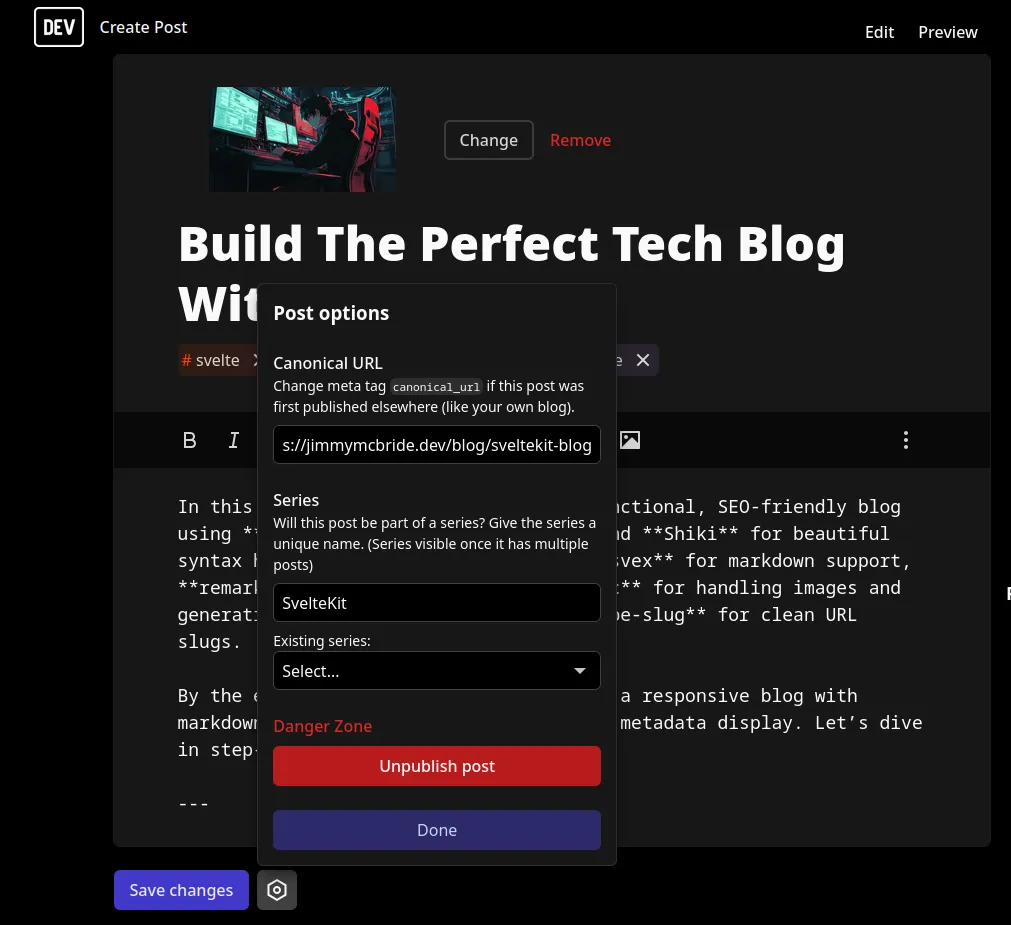
Why Canonical Links Alone Aren't Enough
Canonical tags are necessary, but they are not always sufficient on their own.
Large platforms like Dev.to get crawled constantly. Your personal site usually does not. If you publish to both places around the same time, the Dev.to version can get indexed first simply because its domain is larger and its crawl frequency is higher.
So even with a proper canonical tag in place, the repost can still show up earlier or stronger in search results until Google fully processes the relationship between the two URLs.
That is why I treat canonical links as step one, not the whole strategy.
Sitemaps: Your Fast Pass For Indexing
A sitemap helps search engines understand the structure of your site and discover new URLs faster. Think of it as a direct feed of pages you want crawled and revisited.
If your blog generates a sitemap automatically whenever you publish a new post, search engines get a much cleaner path to your content. Here is an example sitemap implementation for a SvelteKit blog:
import { url } from "$lib/config";
import { SitemapStream, streamToPromise } from "sitemap";
import { Readable } from "stream";
import type { RequestEvent } from "@sveltejs/kit";

export const GET = async ({ fetch }: RequestEvent) => {
  const response = await fetch("/api/posts");
  const posts: Post[] = await response.json();

  const links = posts.map((post: Post) => ({
    url: `/blog/${post.slug}`,
    changefreq: "weekly",
    priority: 0.8,
  }));

  const stream = new SitemapStream({ hostname: url });

  return new Response(
    await streamToPromise(Readable.from(links).pipe(stream)).then((data) =>
      data.toString(),
    ),
    {
      headers: {
        "Content-Type": "application/xml",
      },
    },
  );
};

export const prerender = true;
The exact implementation will vary by framework, but the goal is the same: make it easy for Google to discover your original post quickly.
Once you have a sitemap, submit it to Google Search Console.
Google Search Console: Your Control Center For Indexing
If you care about SEO, Google Search Console is not optional.
There are two tasks that matter most here:
- Submit your sitemap, such as
https://your-site.com/sitemap.xml. - Request indexing for the original article URL after you publish it.
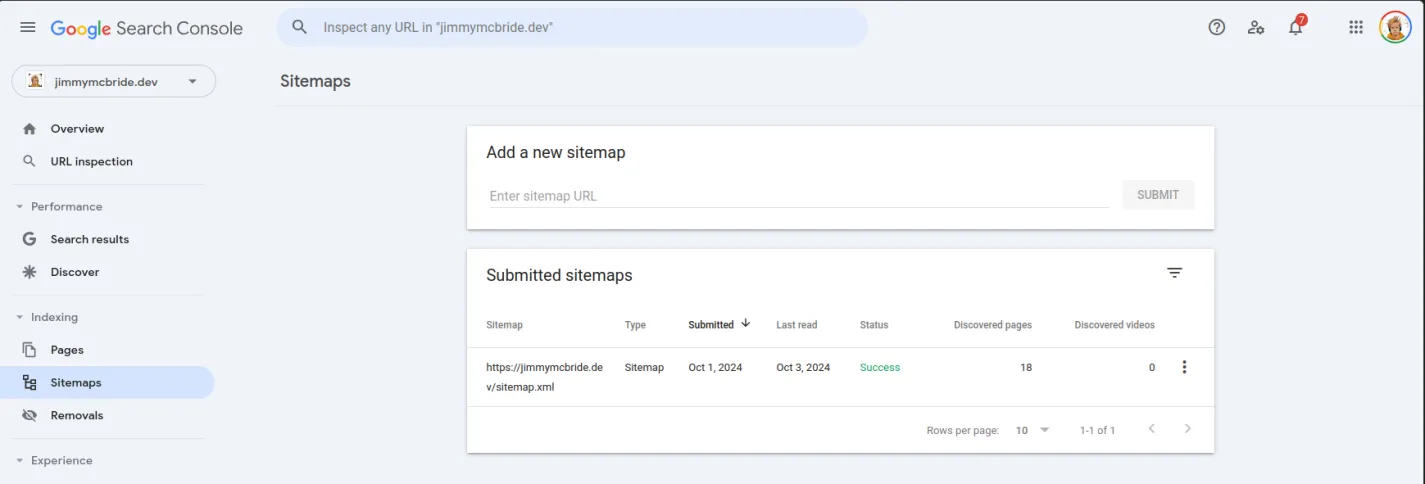
That second step matters. It lets you tell Google there is a fresh page worth crawling right now instead of waiting for the normal crawl cycle.
For syndicated posts, that faster indexing window is important. It increases the odds that your own article gets processed early, which makes it less likely that the repost becomes the version people see first.
The Full SEO Picture
The system works best when all three pieces are in place:
- Canonical URLs tell search engines which version is the source of truth.
- Sitemaps help crawlers discover and revisit your original content faster.
- Google Search Console gives you a way to push new URLs into the index more quickly.
Skip one of those steps and the repost can still outrank your site, especially on larger publishing platforms.
Wrapping Up: SEO Done Right
Dev.to can be a strong growth channel for technical writing. The trick is to use its audience and domain authority without giving away ownership of your content in search.
If you set the canonical URL correctly, keep your sitemap healthy, and use Google Search Console to get the original page indexed quickly, Dev.to becomes a distribution channel instead of an SEO thief.
That is the setup I recommend when you want the reach of a large publishing platform and the long-term traffic value of your own blog.